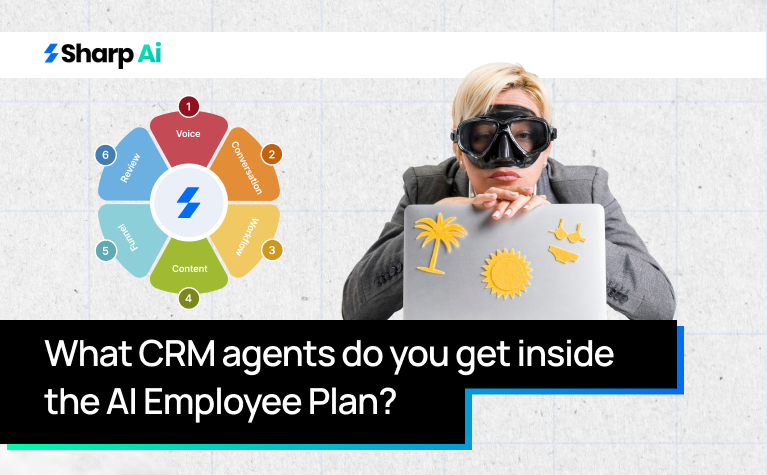
This summer, enjoy your vacations and let these 6 CRM AI Agents in our AI Employee in CRM take care of your business, clients, and Q3. No more work stress, only mimosas and mocktails this summer!
Scroll down to find these AI agents in CRM systems and what they will do for you. We have also added the contact info down below, so you don’t have to waste time and
What is a CRM Agent?
CRM AI Agents are AI-powered digital assistants built into Customer Relationship Management (CRM) systems. These agents automate tasks, provide helpful insights in real-time, and make work easier for human agents.
They can handle routine questions, analyze customer data to predict behaviors, and personalize interactions. CRM AI Agents also help execute complex workflows, allowing employees to focus on more important tasks like building relationships and making strategic decisions.
CRM AI Agents are a key part of CRM automation, improving customer support and helping businesses grow by streamlining customer management and sales processes. They reduce the need for manual work and enhance the overall efficiency of CRM systems.
CRM AI Agents in AI Employee and How They Work
- Voice AI
The Voice AI CRM AI Agents perform in a structured way. For example, a customer calls your sales or support line ( “Hi, I’m interested in your product demo next week”). The Voice AI agent captures the speech and converts it to text using speech-to-text (STT) technology.
Then the converted text is analyzed for:
- Intent (e.g., schedule demo, ask product info, support request)
- Urgency/priority (keywords like “immediately,” “ASAP”)
- Sentiment (frustration, excitement, curiosity)
- Buying signals (e.g., budget discussions, timelines)
- AI Models Used: NLP + sentiment analysis.
Following this, the agent cross-references the caller’s info in the CRM agent platform for:
- Past interactions
- Current pipeline stage
- Account details
The purpose of this action is to personalize the response and determine the next action. An example of this action can be a notification as “this contact is a warm lead in Stage 2 of the sales funnel.”
Based on intent and context, the Agentic AI in CRM generates a response:
- Can be real-time spoken response (text-to-speech) or
- A follow-up task/message in CRM.
For example:
- “I can schedule a demo for Thursday at 3 PM. Does that work?”
- “I see you’re interested in the premium plan; I’ll send details via email.”
Next up, the CRM will be updated and the actions will include:
- Automatic Logging:
- Transcription of the call
- Call duration, intent, and sentiment tags
- Pipeline Automation:
- Move the lead to the next stage (e.g., Demo Scheduled)
- Tag for follow-up reminders or campaigns
- Notifications: Alerts the assigned sales rep or team.
CRM AI agents can perform optional actions that include:
- Triggering SMS or email confirmations
- Scheduling meetings automatically in integrated calendar
- Lining up follow-up calls if needed
The Voice AI in our CRM AI agents catalogue ensures that all tasks are logged and assigned without manual CRM entry. We’re considered the best automation software with AI for a reason!
For reporting and insights, the CRM AI Agents will generate:
- Call volume and outcomes
- Lead sentiment trends
- Conversion likelihood per call
This helps you manage and monitor performance and adjust your business or marketing strategy.
- Conversation AI
Conversation AI CRM AI Agents in AI Employee extract leads or client info from website chat, social media DMs, email replies, SMS. The conversation text is ingested in real-time. For Example: “I’m looking for pricing on your enterprise plan.”
Our CRM AI tools for small business use NLP, contextual embedding, sentiment analysis to detect:
- Detect urgency or priority keywords
- Detect sentiment (positive, frustrated, neutral)
- Identify buying signals or objections
- Customer intent (product info, support, demo request)
The best CRMs with AI:
- Generate human-like responses in text
- Suggest next steps for sales or support teams
- Recommend automated replies for FAQs
For Example:
- “I can schedule a demo on Wednesday at 2 PM. Does that work for you?”
- “Here’s the link to our pricing page for enterprise plans.”
Next up, our AI-powered CRM performs the following function:
- Logging: Every message is logged in the CRM
- Tagging: Assign lead quality, intent, sentiment
- Pipeline Movement: Automatically moves the lead or flags it for follow-up
- Notifications: Alerts assigned sales/support agents for urgent cases
Conversation AI then triggers:
- Automated email/SMS confirmation
- Scheduling meetings
- Queue follow-up tasks
- Trigger multi-step nurture sequences
This keeps conversation threads moving without manual intervention.
- Content AI
Content AI in AI Employee creates, optimizes, and personalizes content for marketing, sales, or customer engagement. Unlike Voice AI or Conversation AI, it’s output-focused rather than interaction-focused.
For example, you get a query, “We are launching a new AI tool for SMBs; target LinkedIn and email campaigns.” The Content AI CRM agent will ingest inputs and build a content context profile.
Then the CRM AI Agents:
- Determines best format: social post, blog, email, ad copy
- Suggests tone, style, and messaging aligned with brand
- Identifies audience segmentation (e.g., SMB vs enterprise leads)
The goal is to maximize engagement and conversion. The next step is content generation. The CRM AI agents will create content based on inputs and strategy:
- Social captions
- Blog posts
- Email campaigns
- Landing page copy
- Video scripts
For optimization, the CRM agent technology ensures:
- SEO optimization for blogs
- CTA testing recommendations
- Engagement prediction (likelihood to click, share, or convert)
- Tone adjustment for platform (LinkedIn vs Instagram vs Twitter/X)
For example, the Content AI agent will shorten sentences for LinkedIn, use hashtags for Instagram etc. For integration with CRM and marketing tools, you can perform these functions and more within the same system:
- Schedule posts or email campaigns
- Update CRM with content campaigns and leads touched
- Trigger follow-up workflows for engaged contacts
- Funnel & Website AI
Funnel AI and Website AI within AI Employee are the components that optimize your sales/marketing funnels and website interactions to maximize conversions. They work hand-in-hand with Voice AI, Conversation AI, and Content AI.
The purpose of Funnel AI is to improve conversion rates across your sales funnels by analyzing visitor behavior, detecting drop-offs, and recommending optimizations.
The workflow of the Funnel AI is as follows:
- Funnel Data Collection
-
-
- Sources: Landing pages, checkout flows, CRM conversion data, campaign analytics.
- AI Action: Collects step-by-step user behavior in the funnel (where users click, drop off, or convert).
-
- Drop-off Analysis
-
-
- Detects pages or steps with high abandonment.
- Identifies friction points (slow load, confusing CTAs, missing info).
-
- AI Recommendations
-
-
- Suggests copy changes or CTA improvements.
- Suggests layout or UX adjustments.
- Prioritizes actions with highest impact on conversions.
-
- Integration with CRM AI Agents
-
-
- Automatically tags leads based on funnel behavior (hot/warm/cold).
- Triggers personalized follow-ups (email, SMS, chat) for engaged users.
-
- A/B Testing & Optimization
-
-
- Sets up experiments on pages or sequences.
- Measures improvement in engagement, lead capture, and sales.
-
- Reporting & Insights
-
- Conversion trends, drop-off rates, engagement metrics.
- Actionable insights to continually improve funnels.
The purpose of Website AI is to convert website visitors into leads and engage them in real time using AI-powered tools. The workflow of these CRM AI Agents is as follows:
- Visitor Detection
-
-
- Tracks visitor behavior: pages visited, time spent, actions taken.
- Identifies intent signals (searching pricing, reading product features, returning visitors).
-
- Real-Time Interaction
-
-
- Launches chat widgets, pop-ups, or AI-guided forms.
- Can respond via Conversation AI or Voice AI (if calling from a web-enabled call).
-
- Lead Qualification
-
-
- Captures visitor info (name, email, role, company size).
- Scores lead quality based on behavioral patterns and AI analysis.
- Moves hot leads directly to CRM pipelines or schedules demos.
-
- Content Personalization
-
-
- Uses Content AI to dynamically display relevant offers, blogs, or CTAs.
- Optimizes messaging for visitor segment, location, or behavior.
-
- Automation & Follow-Up
-
-
- Triggers email sequences, SMS reminders, or retargeting ads.
- Updates CRM with interactions, tags, and engagement score.
-
- Analytics & Iteration
-
- Tracks engagement metrics per page and per lead.
- Feeds insights into Funnel AI to optimize pages or sequences.
- Learn patterns for higher conversions over time.
- Reviews AI
Reviews AI in AI Employee is all about managing, responding to, and leveraging customer reviews to improve reputation and engagement. It works hand-in-hand with CRM, Conversation AI, and Content AI for automated reputation management.
These CRM AI Agents source reviews from Google Reviews, Facebook Reviews, Yelp, e-commerce platforms, CRM customer history. They continuously monitors new reviews and flags them by:
- Sentiment (positive, neutral, negative)
- Platform
- Product/service category
For example, “A 5-star review on Google for our AI demo service.”
The AI CRM AI Agents then does intent analysis as:
- Customer sentiment (happy, frustrated, confused)
- Urgency of response (high for negative reviews, medium for neutral)
- Actionable intent (complaint, praise, suggestion)
The purpose is to prioritize which reviews require human intervention vs automated responses.
The next step of these CRM AI Agents is response generation. For:
- Positive Reviews:
-
-
- AI crafts personalized thank-you responses.
- Encourages engagement or social sharing.
-
- Neutral Reviews:
-
-
- AI responds with clarifying questions or invites feedback.
-
- Negative Reviews:
-
-
- AI drafts empathetic responses.
- Can escalate high-risk complaints to human agents.
-
- Example:
-
- “Thank you, [Name]! We’re thrilled you enjoyed the demo. Feel free to share your experience!”
The next step is CRM integration and follow-up. Reviews are automatically logged in the CRM under the customer profile.
- Tags are applied:
- Satisfaction level
- Product/service mentioned
- Follow-up action required
- Updates pipeline or support tickets if a review signals churn risk.
The CRM AI Agents can trigger:
- Support tickets for negative reviews
- Upsell campaigns for positive reviewers
- Re-engagement sequences for neutral reviewers
- Ensures no review is left unanswered, improving brand perception.
- Ask AI
Ask AI is designed to be your intelligent knowledge assistant, capable of answering questions and guiding users, leads, or employees in real time. It works across multiple channels like website chat, email, SMS, and social DMs.
Whenever someone asks a question, these CRM AI Agents capture it and begin analyzing the intent and determine the urgency and context based on the user’s CRM profile and past interactions.
Next, it retrieves relevant information from multiple sources, such as the CRM, internal knowledge bases, past conversation logs, or even content created by Content AI. Once the information is gathered, Ask AI generates a clear and actionable response. It can provide instructions, suggest next steps, or escalate complex queries to a human agent if needed.
Finally, Ask AI feeds analytics into the system, tracking common questions, trending topics, and areas where content or processes could be improved.
Verdict?
Sharp AI is launching this new plan with a “Free Demo” from 15 April to 15 September, 2026. Spaces are limited so dial +44 7700 174004 right now, so our team can onboard you personally! Time’s running out, hurry up!