
Your salon is booked and busy, but your backend is a disaster. Missed appointments, lost clients, pure chaos. With these 4 CRM setup steps for your beauty salon software, you can clean this mess and make money faster and get more clients. Join 1,000+ Professionals Using the Best Salon Management Software UK So Scroll down to read more!
Why is CRM setup necessary for beauty salon software?
Setting up CRM for beauty salon software is essential to turning scattered client information into a well-organized, actionable database that drives client retention, boosts revenue, and improves client satisfaction. A properly configured CRM transforms a salon’s operations from reactive to proactive, automating tasks and allowing staff to deliver personalized services while optimizing daily activities.
What’s Involved in Setting Up a CRM for Your Salon:
Data Migration
Accurate transfer of existing client data into your new system.
Workflow Customization
Setting up automated appointment reminders, loyalty programs, and marketing campaigns that run smoothly.
Staff Training
Ensuring that your team knows how to use the CRM effectively to improve client service and operational efficiency.
By ensuring your CRM is correctly set up for your beauty salon software, you lay the foundation for smoother operations, better client relationships, and increased revenue. Ready to take your salon to the next level? Buy salon CRM software today and start automating your growth!
How to set up a CRM for beauty salon software
Setting up a CRM for your beauty salon is essential for streamlining operations and improving client experiences. By selecting the right software and following a few simple steps, you can transform your salon’s management, boost efficiency, and increase revenue. Here’s a breakdown of how to get started:
Step 1: Define Your Needs & Choose the Right CRM Software
Identify Your Goals
Determine whether you need better booking, marketing, or client loyalty management.
Research CRM Options
Consider salon-specific CRMs like Phorest, Fresha, Pabau, Mindbody, or general platforms like Zoho. Look for ones that integrate with other tools you use.
Key Features to Prioritize
Focus on appointment scheduling, client profiles, marketing automation, online booking, and payment processing.
Step 2: Data Migration & Setup
Import Client Data
Transfer all existing client data (names, contacts, service history, preferences) into digital profiles.
Configure CRM Settings
Set up your services, staff profiles, working hours, and pricing details within the system.
Integration with Other Tools
Link your CRM with your website, social media, and payment systems for seamless operations.
Step 3: Customize Features & Automate Workflows
Automate Bookings
Enable online booking on your website and social media, syncing calendars and sending instant confirmations.
Automate Reminders
Set up automated SMS/email reminders to reduce no-shows and last-minute cancellations.
Marketing Automation
Create automated loyalty programs, birthday greetings, and targeted promotions based on customer behavior and preferences.
Client Portals
Let clients manage their bookings, view service history, and buy packages online, making it convenient for them.
Step 4: Staff Training & Go Live
Train Your Staff
Provide comprehensive training to ensure your team is well-versed in using the CRM for bookings, managing client notes, and executing marketing tasks.
Pilot the CRM
Start with a small team or specific functions to test the system and address any issues before full implementation.
Track Performance
Use built-in analytics to monitor performance, track client behavior, and make data-driven decisions for growth.
Key Benefits of CRM Setup for Beauty Salon Software
Improved Client Retenstion
It’s 5-7 times more expensive to acquire a new client than to retain an existing one. CRM software stores important client details like birthdays, preferences, and service history, allowing salons to send targeted, personalized marketing that keeps clients coming back.
Reduced No-Shows with Automated Scheduling
With CRM-enabled 24/7 online booking and automated SMS/email reminders, clients are less likely to miss appointments, reducing the impact of cancellations on your revenue.
Centralized Client Data for Personalization
CRM eliminates the need for paper records or scattered spreadsheets by centralizing customer information, giving your staff immediate access to a client’s service history, ensuring consistent, tailored experiences every time.
Operational Efficiency Through Automation
A CRM automates essential tasks like booking appointments, confirming them, sending follow-up messages, and managing inventory. It also helps track employee performance, commissions, and inventory levels to avoid overstocking or shortages.
Data-Driven Insights for Smarter Decisions
CRM software provides valuable reporting tools that help you understand your most popular services, peak times, and top-performing staff, allowing you to make informed decisions and optimize your business strategies.
Revenue Growth via Targeted Marketing
By segmenting clients (e.g., VIPs, new clients, or dormant ones), salons can send customized promotions that encourage repeat visits and higher average spending.
Personalized Client Experience
Deliver tailored services based on client history and preferences, enhancing loyalty.
Increased Efficiency
Centralized data and automated workflows save time, allowing your team to focus on customer satisfaction.
Revenue Growth
Upsell services and products, retain clients with loyalty programs, and increase overall profitability.
By implementing a CRM system, beauty salons can improve their efficiency, enhance client experiences, and drive more revenue. Buy salon CRM software today and start benefiting from automation, seamless integration, and personalized service. Want to try it out? Sign up for a salon software free trial now and see how it can transform your business.
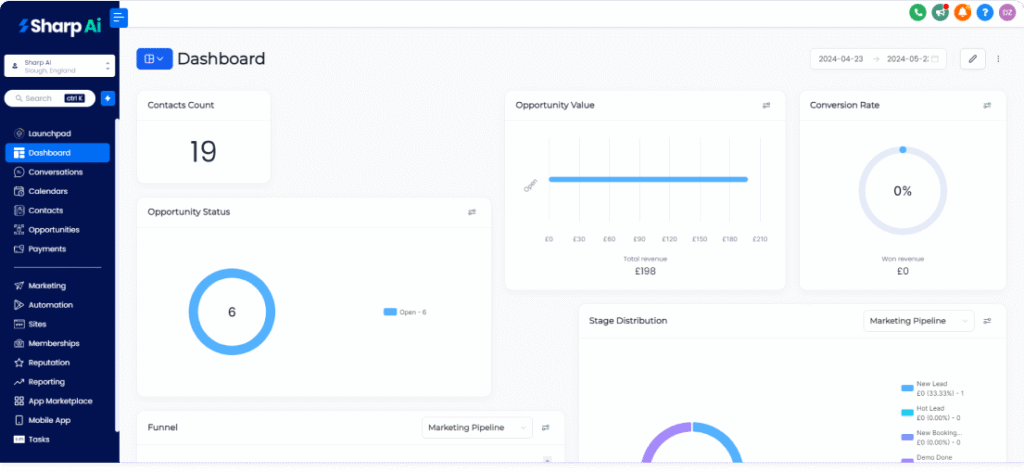
How to set up Sharp AI CRM for beauty salon software?
Setting up Sharp AI CRM for a beauty salon involves integrating automated scheduling, AI-driven customer service, and client management into one platform. The system is designed for quick implementation, allowing users to move from signup to a functional salon management tool in a few steps.
Here is the step-by-step guide to setting up Sharp AI CRM for a beauty salon:
-
Initial Account Setup (60 Seconds)
- Sign Up: Create an account on the Sharp AI platform (a 7-day free trial is typically available).
- Company Profile: Enter your salon’s basic information, including name, location, and contact details.
-
Configure Staff and Operations
- Add Staff Members: Input staff names, roles (e.g., hair stylist, nail technician), and their specific working hours.
- Set Permissions: Define what information staff can access to ensure data security.
- Define Services: List your salon services, including duration and pricing to allow for accurate scheduling.
-
Set Up AI Booking and Scheduling
- Activate AI Voice/Chat Bot: Switch on the built-in AI assistant to handle client queries, bookings, and reschedules 24/7 via text, voice, or WhatsApp.
- Calendar Integration: Sync Sharp AI with Google Calendar or Outlook to ensure real-time visibility across all platforms and prevent double bookings.
- Configure Online Booking Page: Customize your booking page with your logo and service menu, then link it to your website or social media profiles.
-
Configure Client Management (CRM)
- Import Data: Upload existing client lists to centralize contact information and history.
- Create Client Profiles: Utilize deep client cards to store preferences, such as preferred stylist, hair color formulas, or skin type, to facilitate personalized services.
-
Set Up Automation and Marketing
- Automated Reminders: Activate automated SMS/email reminders to reduce no-shows and last-minute cancellations.
- Rebooking Prompts: Configure the system to automatically send follow-up messages to encourage repeat visits.
- Marketing Campaigns: Use the AI to generate and send targeted, personalized promotional offers, such as birthday discounts.
-
Connect Essential Tools
- Payment Gateway: Integrate payment systems to accept in-person or online payments, including tips and deposits.
- Inventory Tracking: Set up alerts for when salon products or supplies are running low.
Summary of Key Features Activated
- 24/7 AI Receptionist: Handles inquiries and bookings instantly.
- Centralized Calendar: Manages all appointments and staff schedules on one screen.
- GDPR Compliance: Ensures customer data security.
For personalized guidance, Sharp AI allows you to contact their CRM administrators, or you can watch their in-app tutorials.
Which CRM is best for beauty salon software?
Which CRM is best for beauty salon software? The list is long and boring, but the answer is short and crispy: Sharp AI. Ranked as the best CRM software for small business UK, our clients have outgrown their 2025 goals.
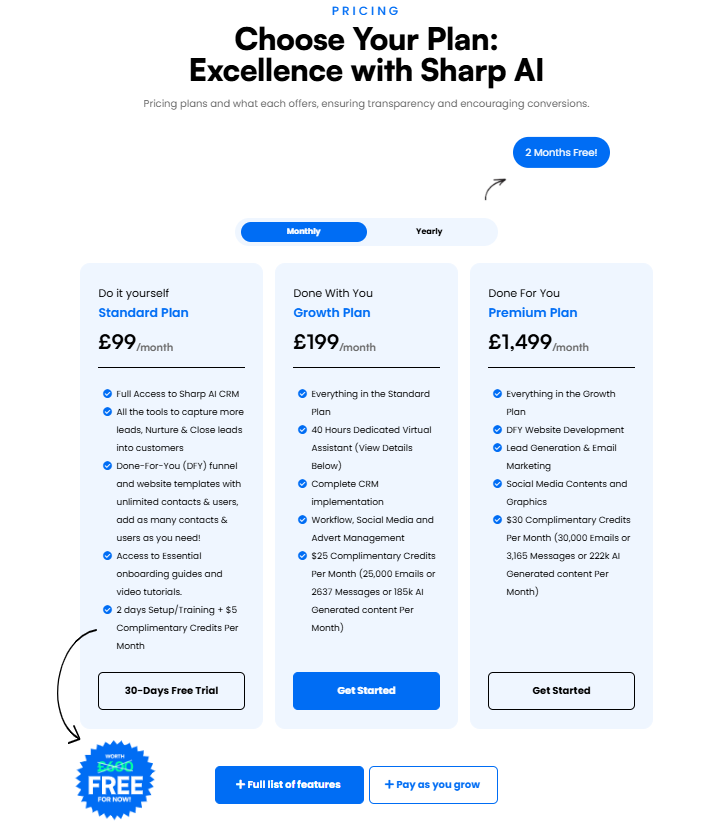
Our AI-powered CRM solutions have helped businesses like yours expand both client-wise and ROI-wise. With 3 different plans starting from £99/month, unlock the potential of your business right here.